Top 5 CRM Software for Small Businesses in 2026
Discover five of the best CRM platforms for small businesses in 2026. Compare AlmariSuite, HubSpot, Zoho CRM, Pipedrive, and Salesforce based on their features and ideal use cases.
Top 5 CRM Software for Small Businesses in 2026
Managing customer relationships becomes increasingly difficult as a business grows. Customer details get scattered across spreadsheets, invoices become harder to track, and important follow-ups can easily be missed.
Customer relationship management software solves these problems by providing one place to manage leads, customers, tasks, conversations, invoices, and sales activity.
However, not every CRM is designed for the same type of business. Some platforms focus on small service businesses, while others provide extensive sales and marketing capabilities for larger organizations.
Here are five of the best CRM platforms to consider in 2026, starting with AlmariSuite.
Quick Comparison of the Best CRM Platforms
| CRM | Best For | Notable Strength |
|---|---|---|
| AlmariSuite | Service businesses and small teams | CRM, invoicing, payments, and follow-ups together |
| HubSpot CRM | Marketing-led businesses | Sales and marketing tools with a free CRM |
| Zoho CRM | Growing businesses | Customization and integration with Zoho products |
| Pipedrive | Sales-focused teams | Visual and intuitive sales pipeline |
| Salesforce | Larger organizations | Advanced customization and enterprise scalability |
1. AlmariSuite
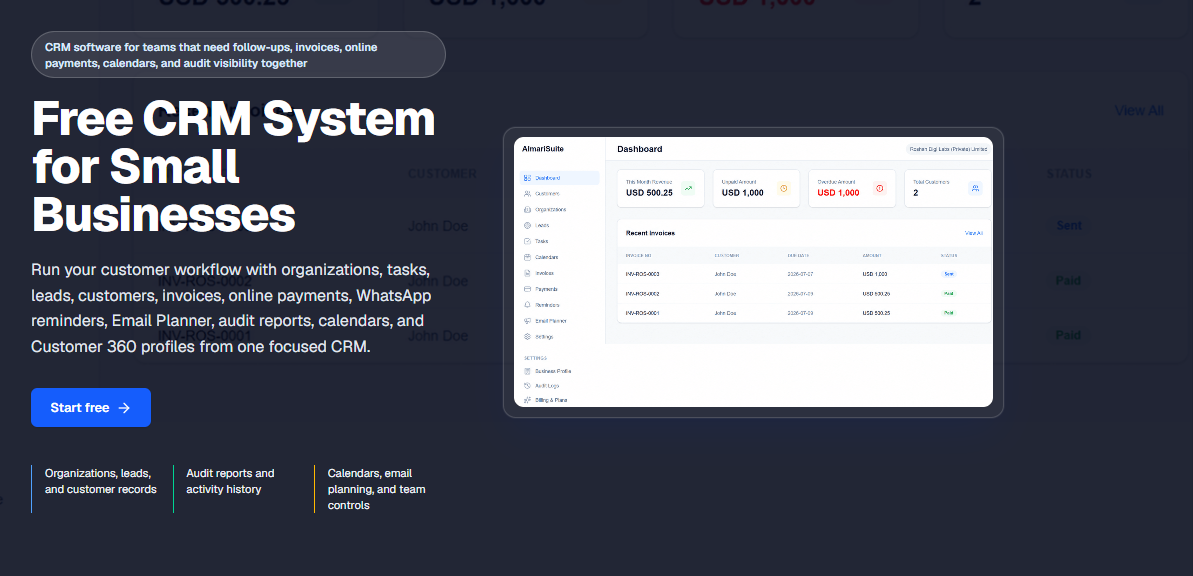
AlmariSuite is a focused CRM platform created for small businesses, agencies, consultants, freelancers, and service teams. It brings customer management, sales follow-ups, invoicing, payments, tasks, and team visibility into a single workspace.
Unlike traditional CRM systems that concentrate primarily on deal tracking, AlmariSuite connects the complete customer journey. A business can capture a new lead, assign it to a team member, convert it into a customer, create an invoice, record payments, and organize subsequent reminders without losing the relationship between those activities.
Key AlmariSuite Features
- Organization, lead, and customer management
- Customizable lead pipeline and ownership
- Tasks, assignments, and shared calendars
- Invoice creation and payment tracking
- Online invoice payments for eligible businesses
- WhatsApp payment reminders
- Customer 360 profiles
- Email campaign planning and recipient exports
- Team roles and permission controls
- Audit reports and activity history
- Operational business dashboard
- Free plan for small teams
Customer 360 provides a particularly useful overview by bringing a customer’s notes, tasks, invoices, payments, reminders, and activity timeline together. Team members can review the complete relationship before calling or messaging a customer.
AlmariSuite also supports practical financial workflows. Businesses can create invoices, share public invoice links, track balances, record payments, and organize reminders for overdue or partially paid invoices.
Who Should Use AlmariSuite?
AlmariSuite is best suited to service businesses that want a straightforward CRM without the weight of a complex enterprise platform. It is especially useful for agencies, consultancies, freelancers, and small teams that need to manage both customer relationships and payment follow-ups.
Its combination of CRM, invoicing, online payments, WhatsApp reminders, tasks, calendars, and audit visibility makes it our first option for small service businesses in this list.
2. HubSpot CRM
HubSpot CRM is a widely used customer platform offering tools for sales, marketing, customer service, content, and data management.
Its free CRM includes contact management, sales activity tracking, deals, tasks, pipeline management, and reporting. Businesses can begin with the free tools and later add premium products as their marketing, sales, and support requirements grow.
Key HubSpot Features
- Contact and company management
- Deal and pipeline tracking
- Sales tasks and activities
- Reporting dashboards
- Marketing and lead-generation tools
- Customer support ticketing
- Email tracking and templates
- AI-assisted sales and marketing tools
- Large integration marketplace
- Mobile CRM application
Who Should Use HubSpot?
HubSpot is a strong choice for companies that want their CRM closely connected to inbound marketing, content, sales, and customer support. Its free tools can be valuable for startups, although costs may increase when a business requires more advanced automation and premium features.
3. Zoho CRM
Zoho CRM is a flexible platform designed to help businesses manage sales, customer interactions, processes, and performance.
One of Zoho CRM’s main advantages is its connection with the broader Zoho software ecosystem. Businesses already using Zoho Books, Zoho Campaigns, Zoho Desk, or other Zoho applications can create a more connected operational environment.
Key Zoho CRM Features
- Lead and contact management
- Sales pipeline management
- Workflow automation
- Sales forecasting and analytics
- Custom fields and modules
- Email and communication tools
- AI-assisted insights through Zia
- Mobile applications
- Integrations with Zoho and third-party products
Who Should Use Zoho CRM?
Zoho CRM is suitable for growing businesses that need greater customization and workflow automation while remaining conscious of software costs. However, its large selection of features and settings may require more setup than a simpler CRM.
4. Pipedrive
Pipedrive is a sales-focused CRM known for its visual pipeline and activity-based approach to selling.
Sales representatives can move deals between pipeline stages, schedule their next activities, monitor deal progress, and identify opportunities requiring attention. Its clean pipeline view makes it relatively easy for teams to understand where each prospect stands.
Key Pipedrive Features
- Visual sales pipelines
- Lead and deal management
- Sales activity scheduling
- Email synchronization
- Workflow automation
- Sales reports and forecasting
- Custom pipeline stages
- Mobile CRM access
- Third-party integrations
Who Should Use Pipedrive?
Pipedrive is best for teams whose main priority is managing a structured sales process. It works particularly well for small and medium-sized sales teams that want an intuitive pipeline without the broader complexity of an enterprise CRM.
Businesses requiring built-in invoicing, advanced marketing, or more extensive service management may need additional applications and integrations.
5. Salesforce
Salesforce is an extensive CRM platform built to support sales, service, marketing, commerce, analytics, and business automation.
Its greatest strength is flexibility. Organizations can customize objects, processes, permissions, reports, and automations around complex business requirements. Salesforce also offers a large marketplace of applications and integrations.
Key Salesforce Features
- Advanced lead and opportunity management
- Highly customizable sales workflows
- Sales forecasting and analytics
- Marketing and service products
- AI-powered business capabilities
- Extensive automation options
- Detailed permissions and team controls
- Large application ecosystem
- Enterprise-level scalability
Who Should Use Salesforce?
Salesforce is most appropriate for established organizations with complicated processes, larger teams, and the resources needed to configure and maintain the platform.
Small businesses with straightforward requirements may find it more complicated and expensive than necessary. However, it remains a powerful choice for organizations expecting considerable operational complexity.
How to Choose the Right CRM
Before selecting a CRM, identify which customer activities your business needs to manage. Consider the following questions:
- Do you need only lead tracking or complete customer management?
- Should invoices and payments be connected to customer records?
- Does your team use WhatsApp for customer follow-ups?
- Do you need marketing automation or email campaign tools?
- How many team members will use the platform?
- Does the CRM require extensive setup or ongoing administration?
- Can its pricing remain affordable as your team grows?
A smaller business will often benefit more from a focused platform that employees can begin using quickly. A larger company may need deeper customization, automation, integrations, and reporting.
Final Verdict
Each CRM in this list serves a different type of business.
AlmariSuite is our leading option for small service businesses that want to connect leads, customers, tasks, invoices, payments, WhatsApp reminders, calendars, and team accountability. HubSpot is well suited to marketing-led organizations, while Zoho CRM provides extensive customization and a broad business software ecosystem.
Pipedrive is an excellent option for teams focused primarily on visual sales pipeline management. Salesforce provides the customization and scalability required by larger organizations with more complex operations.
If your business needs a practical CRM that goes beyond basic contact management, start using AlmariSuite and bring your customer and payment workflows into one organized platform.